Trying Shopify's Reflex Architecture in Swift and Kotlin
This is an English version of a post I originally wrote in Japanese.
Shopify Engineering recently wrote about Reflex, the architecture behind their mobile apps.
 Reflex: an architecture for building mobile apps with agents (2026) - ShopifyOur architecture lets agents test mobile app behavior without an emulator and use one test suite to keep iOS and Android in sync.Shopify
Reflex came out of Shopify’s move from React Native back to native. Each platform gets its own native implementation, and a single shared test suite keeps iOS and Android behaving the same way.
The post explains the design in enough detail to rebuild it, so I tried building it myself in Swift and Kotlin.
Shopify goes back to native#
Shopify moved to React Native in 2020. In September 2026, they announced that they had replaced it with native Swift and Kotlin.
 Native is now the future of mobile at Shopify (2026) - ShopifyCoding agents changed what it costs to build mobile apps twice. Here’s why Shopify is moving from React Native back to Swift and Kotlin.Shopify
The main reason they gave was coding agents. An agent can now write one platform’s implementation by reading the other’s, so building every feature twice no longer costs what it did in 2020.
Going native still means every screen exists twice, once per platform. Reflex is Shopify’s answer to keeping those two implementations in sync.
What Reflex is#
Reflex is an MVVM-based architecture that pulls the app’s logic out of the UI so it can run without a simulator or emulator. It also assumes agents will write most of the code and is built to give them a fast feedback loop.
It isn’t a library. The blog post is the specification.
Share tests, not code#
The Core, where the logic lives, is written separately in Swift and Kotlin. There’s no shared code layer.
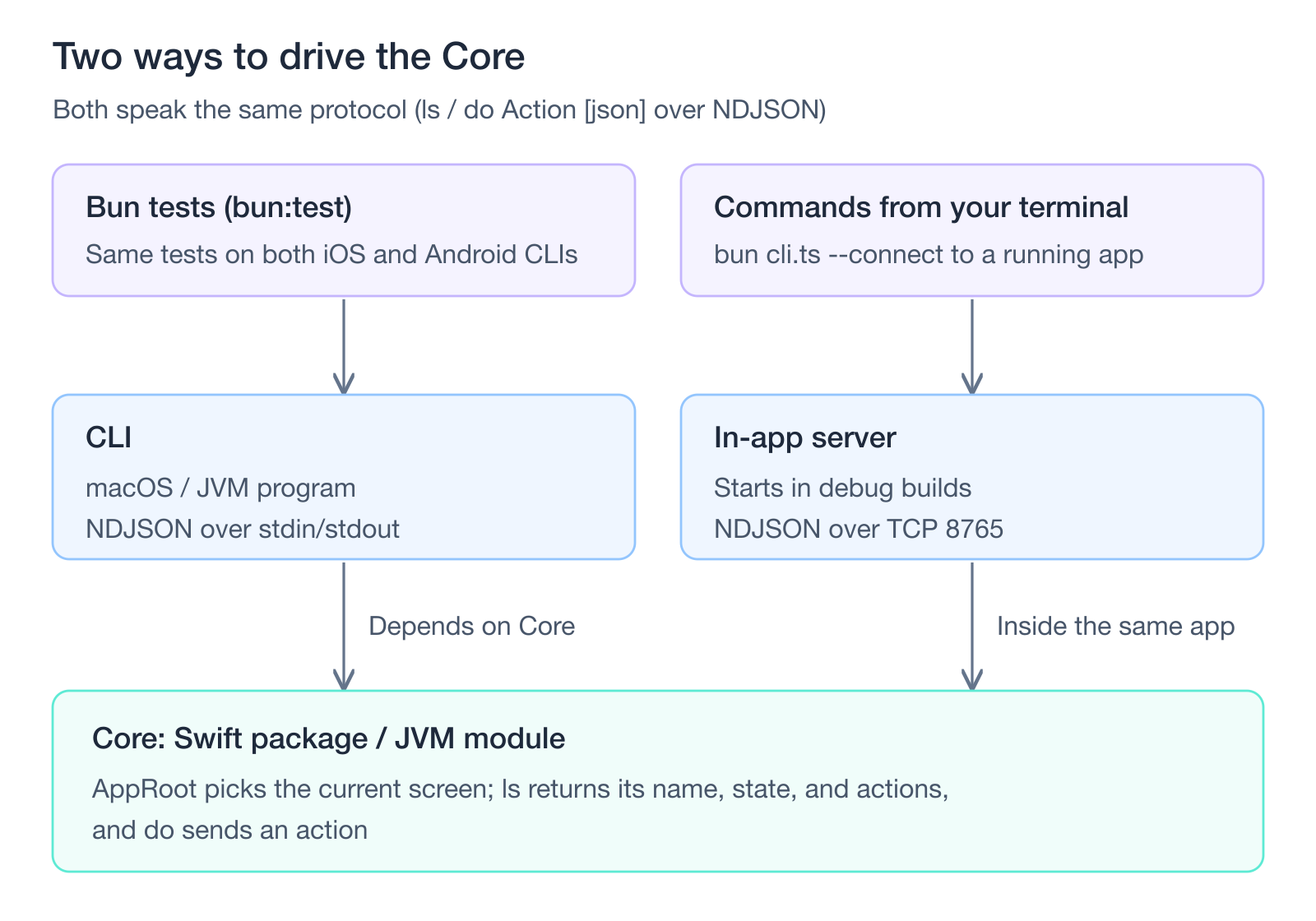
Instead, behavior tests are written once in TypeScript and run against both platforms with Bun’s test runner (bun:test). A PR that passes on only one platform can’t be merged.
The tests follow a few rules:
- All HTTP is blocked. Any attempt to reach the network fails the test, even if the app swallows the error.
- Device state and API responses are passed to constructors as fixtures.
- No mocking frameworks.
The first rule keeps tests off the real network, since traffic that bypasses the fixtures makes tests slow and flaky. Blocking the request alone isn’t enough, because an app that catches the error and carries on would still pass. That’s why the attempt itself counts as a failure.
On CI, Shopify runs more than 1,700 behavior tests against both platforms in about four minutes.
A UI-free Core, driven from outside#
On iOS, the Core is a plain Swift package. On Android, it’s a plain JVM module. Neither touches UIKit, SwiftUI, or android.*.
The Core owns the ViewModels, the services, and even navigation state. Platform features come in through constructors, as implementations of protocols (interfaces, in Kotlin) that the Core declares. There’s no DI framework.
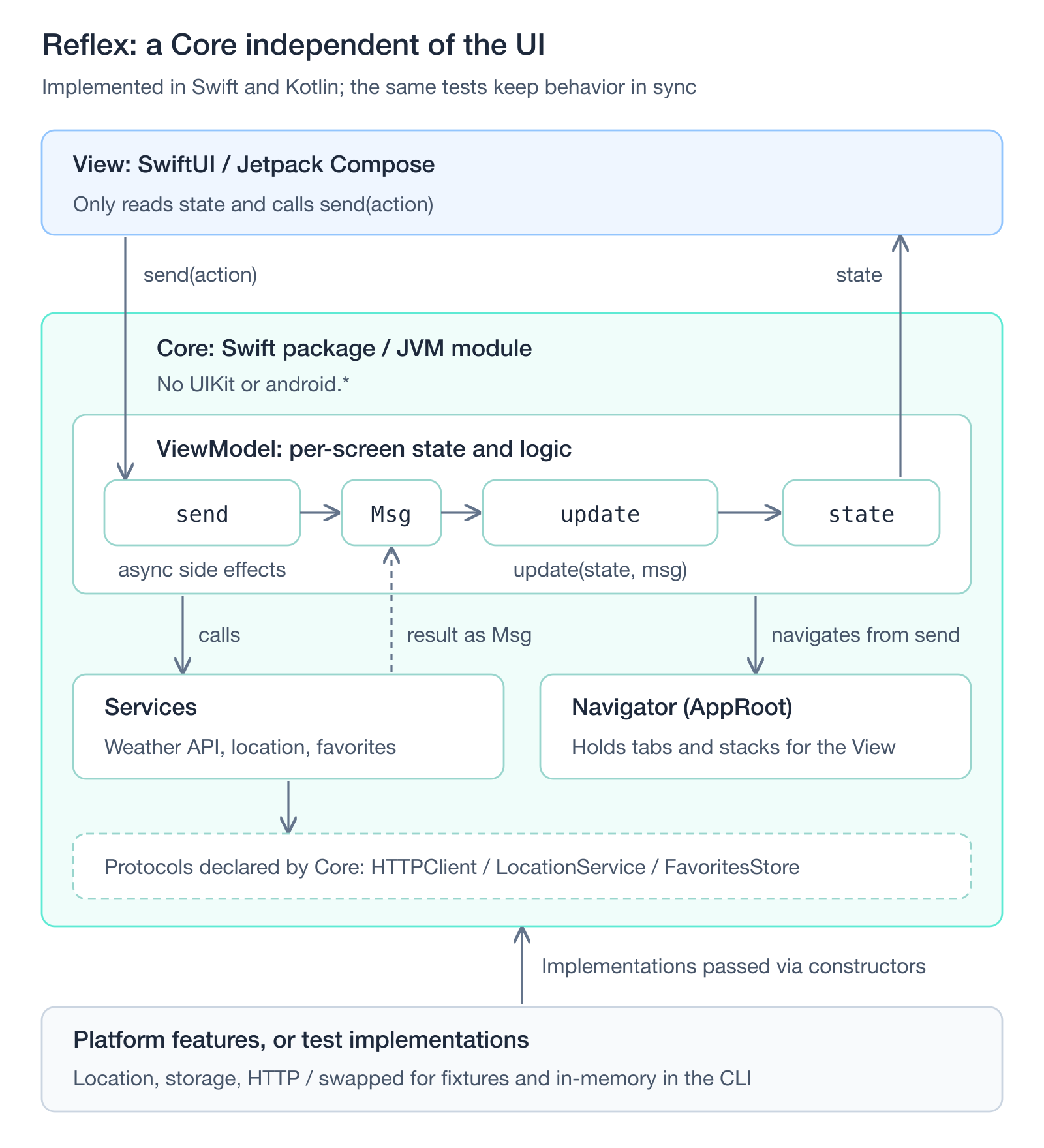
ViewModels follow the Elm Architecture. Actions sent from outside via send(action:) and results returned by services are both turned into internal messages and passed to update(state, message). update is the only place state changes. A View has exactly two jobs: read state and call send(action:).
If you’ve used The Composable Architecture (TCA) on iOS, or MVIKotlin or Orbit MVI on Android, this unidirectional flow will look familiar. Unlike a TCA reducer, though, my update can’t return side effects as Effects, so send runs the async work itself and passes the result to update as a message. In Redux terms, update is the reducer and send is a thunk.
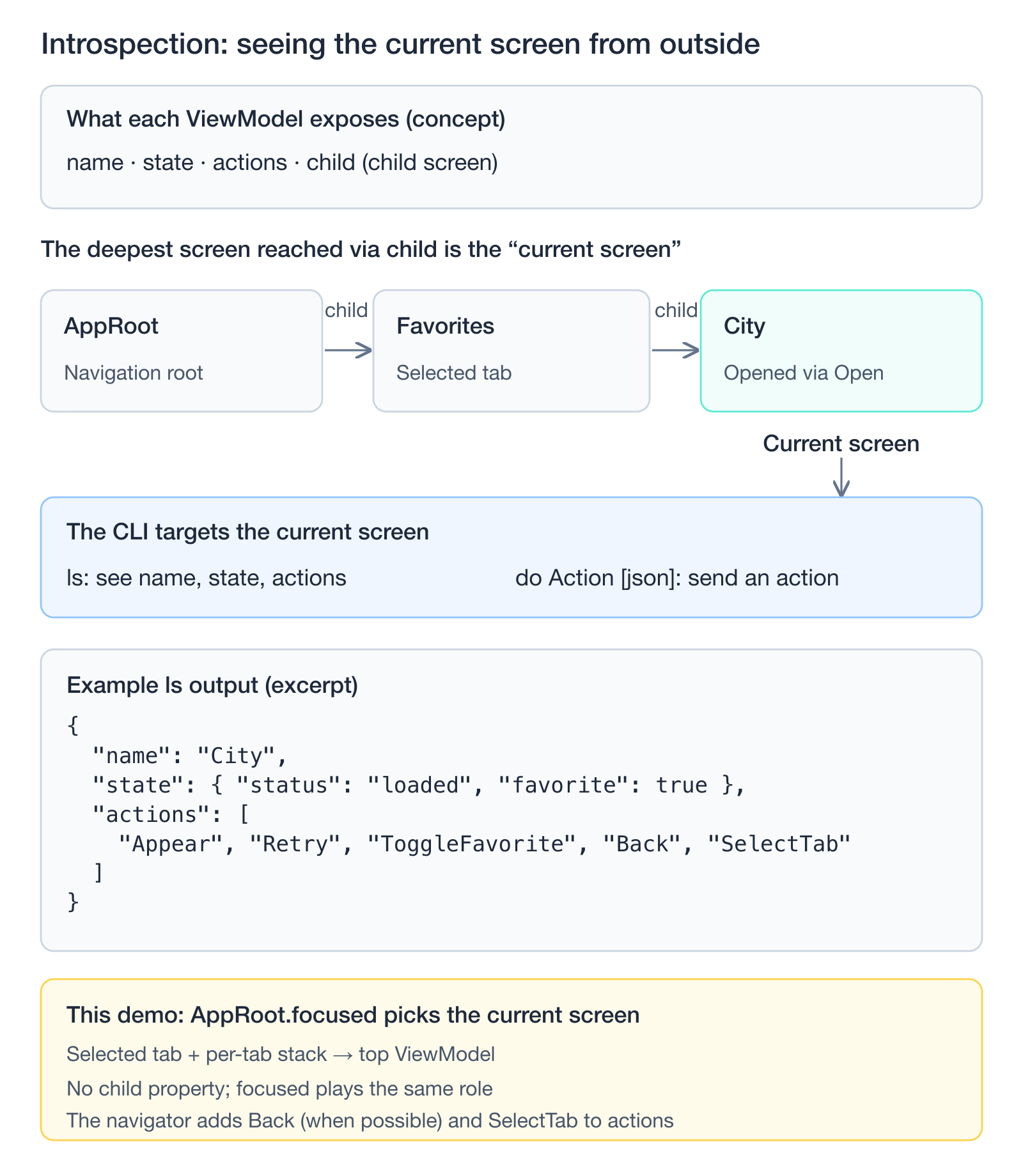
Each ViewModel exposes four properties, which together make up what Reflex calls Introspection:
name: the screen’s namestate: everything the user can seeactions: everything the user can dochild: the child screen currently shown, if any
The CLI follows child from the root down to the deepest screen and treats that as the current screen. It has just two commands: ls shows the current screen’s name, state, and available actions, and do Action [json] sends an action.
In my version, ViewModels don’t have a child. Instead, AppRoot works out the current screen (focused) from the selected tab and that tab’s stack.
The CLI is a command-line program for macOS or the JVM that links against the Core and speaks NDJSON (one JSON object per line) over stdin and stdout. Debug builds of the real app run a small socket server that speaks the same protocol, so the same commands work against a running app.
Building a demo app#
To try it out, I built a weather app that shows the forecast for your current location.
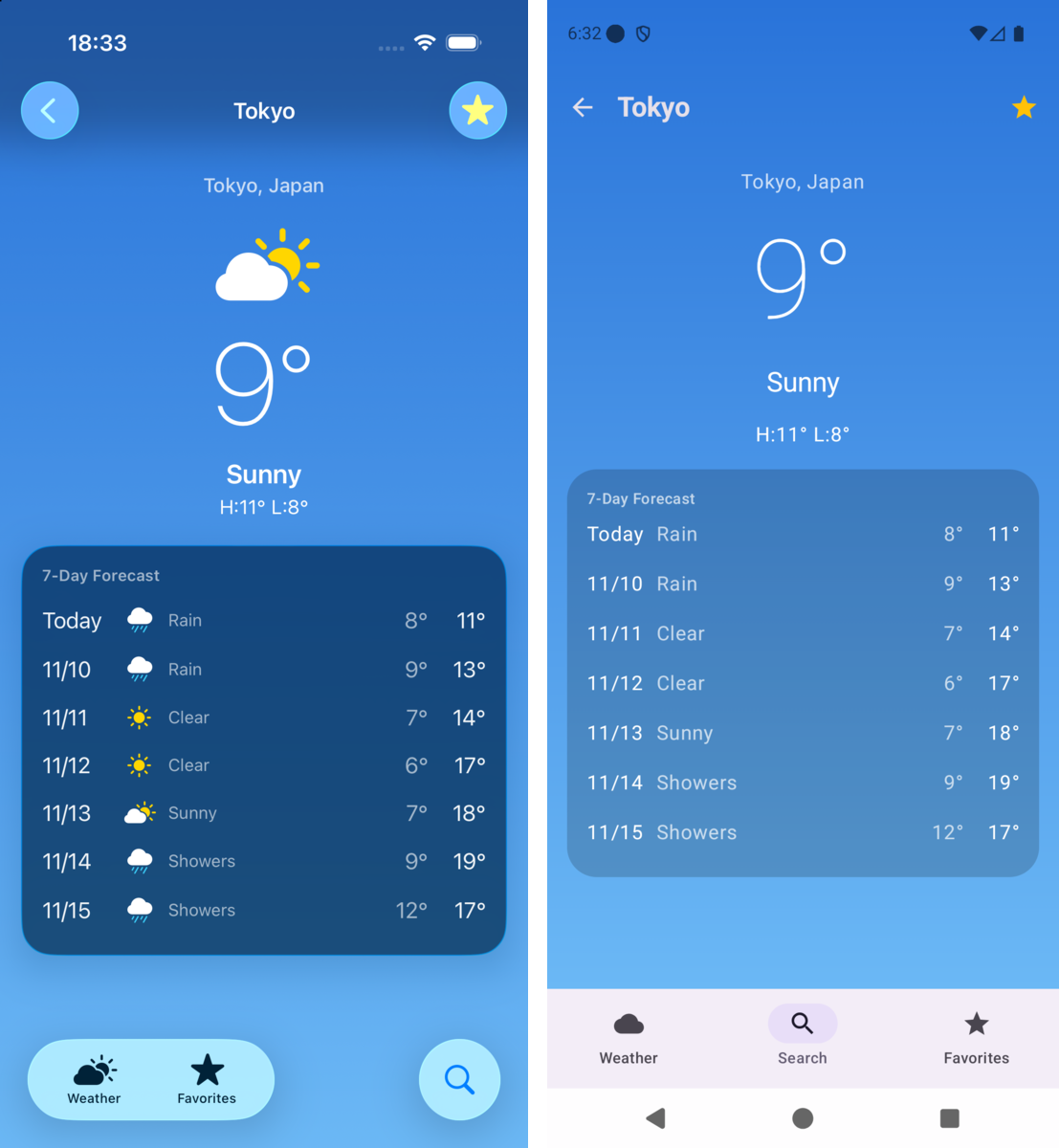 SwiftUI on the left, Jetpack Compose on the right. Both were driven to this screen from the CLI on my Mac, with no taps.
It has three tabs: current weather, city search, and favorites. The data comes from Open-Meteo, which doesn’t need an API key.
| iOS | Android | |
|---|---|---|
| Core | Swift package (no UIKit, SwiftUI, or CoreLocation imports) | JVM module (no android.*) |
| CLI | weather-cli, runs on macOS | cli, runs on the JVM |
| App | SwiftUI (iOS 26 Liquid Glass) | Jetpack Compose (Material 3) |
| Platform implementations | URLSession, CoreLocation, UserDefaults | HttpURLConnection, LocationManager, SharedPreferences |
There are 21 behavior tests in TypeScript under tests/, run with Bun. The fixtures are recorded Open-Meteo responses, shared by both platforms.
The code is on GitHub:
Writing each ViewModel twice#
Here’s the ViewModel for the current-weather screen in Swift (trimmed):
WeatherViewModel.swift
@MainActor @Observable public final class WeatherViewModel: ViewModel {
  public enum State: Encodable, Equatable {
    case idle
    case loading
    case permissionDenied(canAskAgain: Bool)
    case loaded(forecast: Forecast, place: String?)
    case error(message: String)
  }

  public enum Action: Decodable { case appear, retry, openSettings, openSearch }

  enum Msg {
    case loading
    case denied(canAskAgain: Bool)
    case loaded(Forecast, place: String?)
    case failed(String)
  }

  public private(set) var state: State = .idle

  static func update(_ state: State, _ msg: Msg) -> State {
    switch msg {
    case .loading: .loading
    case .denied(let canAskAgain): .permissionDenied(canAskAgain: canAskAgain)
    case .loaded(let forecast, let place): .loaded(forecast: forecast, place: place)
    case .failed(let message): .error(message: message)
    }
  }

  private func dispatch(_ msg: Msg) { state = Self.update(state, msg) }

  public func send(_ action: Action) async {
    switch action {
    case .appear:
      switch state {
      case .idle, .permissionDenied: await load()
      default: break
      }
    case .retry: await load()
    case .openSettings: deps.location.openSettings()
    case .openSearch: nav.selectTab(.search)
    }
  }
}
The Kotlin version has almost the same shape. Note that ViewModel here is a small base class in the Core, not androidx.lifecycle.ViewModel.
WeatherViewModel.kt
class WeatherViewModel internal constructor(private val deps: Deps, private val nav: Navigator) :
  ViewModel<WeatherState, WeatherAction, WeatherViewModel.Msg>(
    WeatherState.Idle, WeatherState.serializer(), WeatherAction.serializer()
  ) {
  override fun update(state: WeatherState, msg: Msg): WeatherState = when (msg) {
    Msg.Loading -> WeatherState.Loading
    is Msg.Denied -> WeatherState.PermissionDenied(msg.canAskAgain)
    is Msg.Loaded -> WeatherState.Loaded(msg.forecast, msg.place)
    is Msg.Failed -> WeatherState.Error(msg.message)
  }

  override suspend fun send(action: WeatherAction) {
    when (action) {
      WeatherAction.Appear -> if (state.value is WeatherState.Idle || state.value is WeatherState.PermissionDenied) load()
      WeatherAction.Retry -> load()
      WeatherAction.OpenSettings -> deps.location.openSettings()
      WeatherAction.OpenSearch -> nav.selectTab(Tab.Search)
    }
  }
}
Writing everything twice sounds tedious, but because the shape is fixed, the second version is close to a mechanical translation of the first. With an agent doing the writing, the duplication barely matters.
One place I diverged from Reflex is where the app decides whether to accept an action. In Reflex, update makes that call. Mine only returns a new state and can’t trigger side effects, so the decision lives in send next to the side effects, and update just maps results to state.
Matching the state JSON#
The tests compare state from both platforms as JSON, so the JSON has to have the same shape. Two rules took care of that:
- Unions are tagged with
status. In Swift I wroteencode(to:)by hand. In Kotlin I put@JsonClassDiscriminator("status")on the sealed interface. nullis always written. Swift’s synthesizedEncodableconformance omits keys fornilvalues, so my hand-writtenencode(to:)callsencodeinstead ofencodeIfPresent. kotlinx.serialization writesnull, but skips properties that have default values unlessencodeDefaults = true, so I turned that on.
Navigation lives in the Core, too#
AppRoot sits at the root of the app and holds the selected tab plus a stack for each tab (trimmed):
AppRoot.swift
@MainActor @Observable public final class AppRoot: Navigator {
  public private(set) var tab = AppTab.weather
  public private(set) var paths: [AppTab: [CityViewModel]] = [.search: [], .favorites: []]

  /// The top of the selected tab's stack. Corresponds to Reflex's "deepest node".
  public var focused: Node {
    switch tab {
    case .weather: weather
    case .search: paths[.search]!.last ?? search
    case .favorites: paths[.favorites]!.last ?? favorites
    }
  }

  /// The current screen's actions, plus the ones the navigator handles (Back, SelectTab)
  public var actions: [String] { focused.actions + (canGoBack ? ["Back"] : []) + ["SelectTab"] }
}
AppRoot also sends Appear to whichever screen gains focus. Because this lives in the Core, the CLI and the app behave the same way, so questions like “does switching tabs trigger a reload?” can be answered headlessly.
Every response waits for async work to finish. send awaits its side effects, and AppRoot keeps track of the Appear it sent on a focus change, so its idle() method can wait for that too. As a result, every do response contains the state after everything has settled, and tests never need sleeps or polling.
The View just renders this state. In SwiftUI, the TabView selection and the NavigationStack(path:) binding are both wired to AppRoot (trimmed):
WeatherApp.swift
struct RootView: View {
  let root: AppRoot

  private func path(_ tab: AppTab) -> Binding<[CityViewModel]> {
    Binding(get: { root.paths[tab] ?? [] }, set: { root.setPath($0, for: tab) })
  }

  var body: some View {
    TabView(selection: Binding(get: { root.tab }, set: { root.selectTab($0) })) {
      // Weather and Favorites tabs omitted
      Tab(value: AppTab.search, role: .search) {
        NavigationStack(path: path(.search)) {
          SearchScreen(vm: root.search)
            .navigationDestination(for: CityViewModel.self) { CityScreen(vm: $0) }
        }
      }
    }
  }
}
The Compose side skips Navigation Compose entirely. It collects AppRoot’s StateFlows and draws whatever is on top of the stack (trimmed):
Screens.kt
@Composable
fun RootView(root: AppRoot) {
  val tab by root.tab.collectAsState()
  val paths by root.paths.collectAsState()
  val top = paths[tab]?.lastOrNull()
  BackHandler(enabled = top != null) { root.back() }

  Scaffold(bottomBar = { /* NavigationBar that calls root.selectTab(t) */ }) { padding ->
    when {
      top != null -> CityScreen(top, onBack = root::back)
      tab == Tab.Weather -> WeatherScreen(root.weather)
      tab == Tab.Search -> SearchScreen(root.search)
      else -> FavoritesScreen(root.favorites)
    }
  }
}
Swiping back on iOS or using the system back gesture or button on Android pops the Core’s stack as well.
Input with the wrong type, such as do Open {"id":"tokyo"}, is rejected before it reaches the ViewModel. Reflex uses macros to generate JSON Schemas for this. I kept it simpler: if Swift’s Decodable or Kotlin’s @Serializable can’t decode the input, it’s an error.
The CLI and its protocol#
Here’s what the exchange looks like:
→ {"cmd":"launch","route":"/search","location":{"granted":false},"favorites":[1850147]}
→ {"cmd":"do","action":"Open","input":{"id":1850147}}
→ {"cmd":"env","http":"offline"}
← {"ok":true,"path":"/cities/1850147","name":"City","state":{...},"actions":["Appear","Retry","ToggleFavorite","Back","SelectTab"],"env":{...}}
On top of ls and do, I added launch and env for tests, and open for the app.
| Command | What it does | CLI | App |
|---|---|---|---|
ls | Returns the current screen’s name, state, and actions | ✓ | ✓ |
do Action [json] | Sends an action and responds once its side effects finish | ✓ | ✓ |
launch | Recreates the app at a deep link with a given device environment (location permission, connectivity, saved favorites) | ✓ | |
env | Changes the device environment (location permission, connectivity, weather code) mid-test | ✓ | ✓ (connectivity and weather code only) |
open | Opens a deep link | ✓ |
env makes it easy to set up scenarios like “the user enabled location in Settings and came back to the app”. The env field in each response reports device state that’s visible from outside the app, such as how many times the app opened Settings, the saved favorites, and the number of HTTP requests.
In the CLI, the HTTP client is replaced with one that serves fixtures. That doesn’t stop a screen from calling URLSession.shared directly and bypassing Deps, though. To catch that, the CLI blocks outgoing traffic with URLProtocol on iOS and ProxySelector on the JVM, and reports the number of attempts in each response. The count is tracked outside the app’s own error handling, so a test can fail on any attempt even if the app swallows the error.
One test suite, two platforms#
The test SDK is a thin layer that starts the CLI process and sends it NDJSON:
tests/sdk.ts
const COMMANDS = {
  ios: [path.join(ROOT, 'ios/.build/debug/weather-cli')],
  android: [path.join(ROOT, 'android/cli/build/install/cli/bin/cli')],
};
The tests themselves don’t know which platform they’re running against:
tests/weather.test.ts
test('reloads when returning to the Weather tab after granting permission in Settings', async () => {
  const app = await launch({ location: { granted: false, canAskAgain: false } });
  await app.do('OpenSettings');
  await app.do('OpenSearch'); // leave the Weather tab so Appear fires when we come back

  await app.env({ location: { granted: true } }); // the user grants permission in Settings
  expect(await app.do('SelectTab', { tab: 'weather' })).toMatchObject({
    name: 'Weather',
    state: { status: 'loaded' },
  });
});
PLATFORM=ios bun test and PLATFORM=android bun test run the same 21 tests against each CLI.
| Target | Time for 21 tests |
|---|---|
| iOS (Swift CLI) | 48 ms |
| Android (Kotlin CLI) | 270 ms (including JVM startup) |
The CLI process is shared across tests, and launch just recreates the app state inside it. Since the JVM starts once rather than once per test, Android is fast too.
Shared tests also surface differences between the platforms. When I sent a number as a string, as in do Open {"id":"1850147"}, Swift’s Decodable rejected it, but kotlinx.serialization quietly parsed it as an Int. Adding that one input to the shared tests made only Android fail. I made the Kotlin side reject quoted numbers too, and both platforms passed again.
Driving the running app#
In debug builds, the app runs a server on TCP port 8765 that accepts the same NDJSON. On iOS, it’s built on NWListener from the Network framework and wrapped in #if DEBUG. On Android, it’s a ServerSocket that only starts in debug builds. Keeping it debug-only matters on Android, because other apps on the device can connect to loopback too.
cli.ts is a small TypeScript wrapper. By default it spawns the Swift or JVM CLI. With --connect, it sends the same commands to the app running in the simulator or emulator instead:
bun cli.ts --connect localhost:8765 do SelectTab '{"tab":"search"}' do ChangeQuery '{"query":"Tokyo"}' do Submit do Open '{"id":1850147}'The iOS Simulator shares the Mac’s network, so localhost works as is. The Android emulator has its own network, and the app only listens on loopback, so run adb forward tcp:8765 tcp:8765 first. That’s how both apps in the screenshot above got to the Tokyo screen.
The app’s server also supports the connectivity and weather-code parts of env. The weather code is swapped into the real API response, so you can bring up the rain or snow screens on a sunny day, and the connectivity switch brings up the offline screen:
bun cli.ts --connect localhost:8765 env '{"weatherCode":71}' do Retry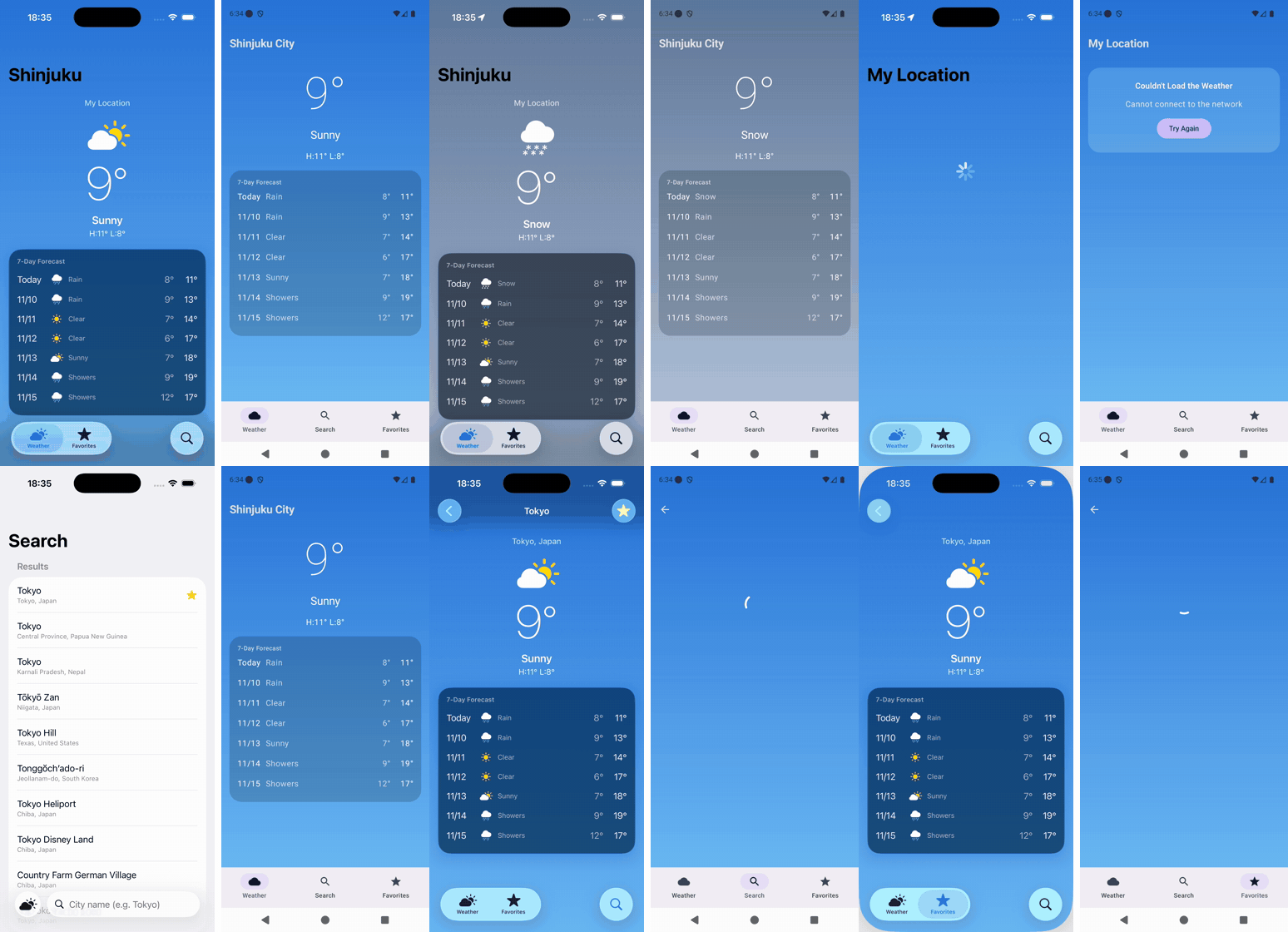 iOS on the left, Android on the right. The same commands switch the weather to rain, snow, thunderstorm, and offline, then move on to search and favorites.
Watching the real UI move through screens this quickly, without hunting for tap coordinates, is satisfying. Each do took 5–250 ms, or about a second for search, which hits the real API.
This also helps with screens that are normally hard to reach on a device. Seeing the rainy-day or snowy-day UI, or the error screen when the network drops, used to mean waiting for the right weather or fiddling with network settings. With env, each scenario is one command away. That makes visual checks easy, and you could use it to capture a screenshot of every scenario.
What only showed up on devices#
All the headless tests passed, but running on the simulator and emulator still turned up a few problems:
- On the Android emulator, the location request never returned, so the screen was stuck loading. I now use the last known location first and time out after 15 seconds.
- In SwiftUI, the
ScrollViewbackground collapsed into a thin strip while loading. - On Android, switching tabs mid-load cancelled the coroutine from
rememberCoroutineScope, and the cancellation showed up as an error. I now runsendinlifecycleScopeand rethrowCancellationException.
None of these were Core bugs. They were all about platform integration or appearance. Shopify also checks visuals separately, with visual review and screenshot tests. I ended up with the same split: behavior is tested headlessly, and appearance and integration are checked on devices.
Device checks can increasingly be handed to agents that look at the screen and operate it. Running those checks as tests with an AI-driven E2E tool seems like a natural next step.
Wrapping up#
What stood out most to me was the idea of keeping two implementations in sync by sharing tests rather than code. Because the Core is independent of the UI, the same 21 tests can confirm that two completely separate implementations behave the same, in a few hundred milliseconds and without a device.
Driving a running debug build from the CLI turned out to be just as useful. Switching the weather or connectivity brings up any screen right away, which makes manual checks easier for people and agents alike. I’d consider adding this even to native apps that don’t share tests.
That said, going native means roughly twice as much code as going cross-platform, and you need a separate way to verify that the UI looks and behaves the same on both platforms. Cross-platform frameworks like React Native still have real advantages.
At the same time, once the tests are independent of the implementation language, you could start with React Native while the app is small and move to native later, using the same tests to confirm nothing changed along the way. That makes the migration less risky, and to me that actually makes it easier to choose cross-platform at the start.