First Impressions of Expo Exact, a New Rust-Powered App Runtime
This is an English version of a post I originally wrote in Japanese.
Expo recently released a new cross-platform app runtime called Exact.
https://twitter.com/ccheever/status/2119764253242695754
This post is a first impression from building a small weather app with Exact. I’d already built the same app in SwiftUI and in React Native (Expo), so I also compared the look, app size, and launch time across the three.
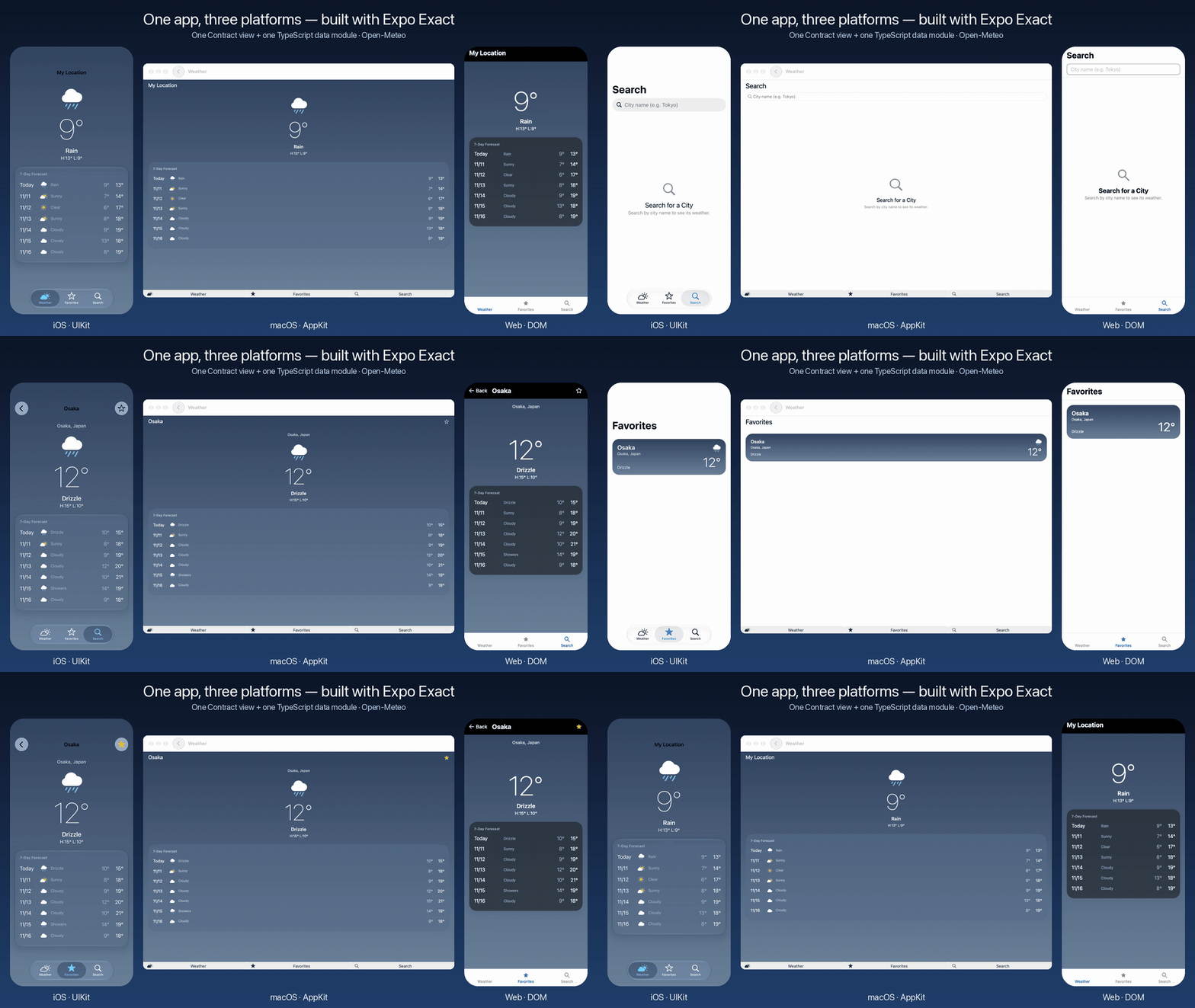 From left: iOS (UIKit), macOS (AppKit), and the web (DOM). The same code drives all three, and the same commands run them side by side.
Exact is pre-1.0 and changes almost daily. This post is based on the commit I used in November 2026 (
94b8671).
What Exact is#
The README opens with:
Write an app once. It runs natively on the web, macOS, iOS, and Linux, and an AI agent can build it, run it, see it, and test it on every one of them.
Android and Windows are in the README’s “Not yet” list. Android is early: you can build, test, and drive it from an agent on an emulator or device, but there’s no distribution or store packaging yet. Windows has a rendering backend and demo apps, but no standard controls or distribution. I tried iOS, macOS, and the web.
The internals are nothing like React Native:
- The UI is written in a small declarative language called Contract.
- You declare screens, state, and actions. Styling uses CSS names, and anything you don’t specify defaults to each platform’s own look.
- Data fetching and storage are written in TypeScript (or Rust).
- Contract can’t do network or file I/O. Everything goes through a separate “data module”.
- Contract is compiled to a “plan”.
- On iOS and macOS, a Rust runner executes the plan, a Rust layout kernel (a fork of Taffy) computes box positions and sizes, and a Swift host draws them with UIKit or AppKit.
- On the web, a small JS runtime (about 20 KB, per the README) executes the same plan against the real DOM and lets the browser handle CSS layout.
- Neither path uses a WebView, and neither runs the app’s JS to draw the UI.
- Agent-facing operations are built in.
tree,screenshot,tap,type,state,clock, and so on all work the same way on web, iOS, and macOS.
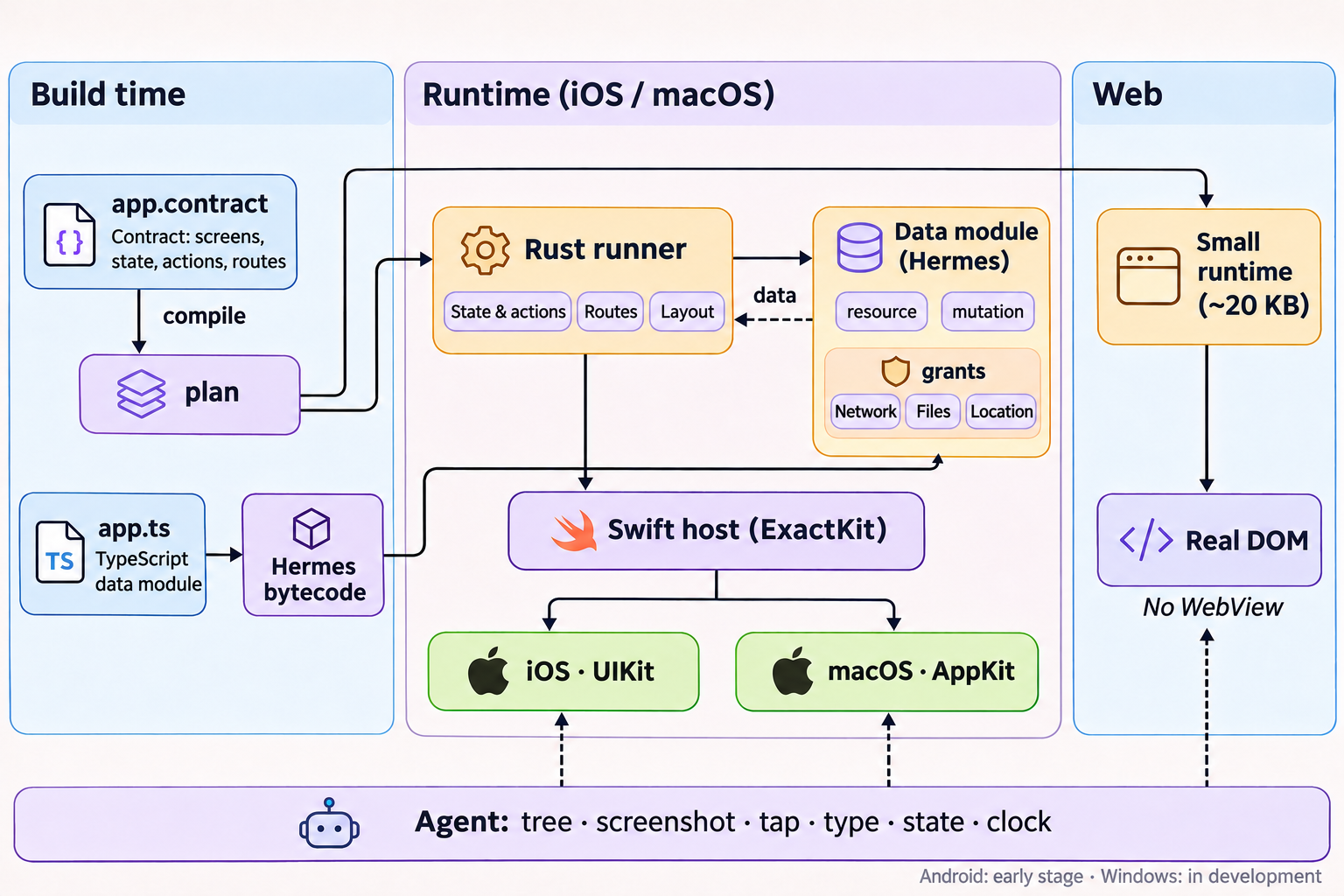 A Contract is compiled to a plan at build time. On iOS and macOS, a Rust runner drives a Swift host that talks to UIKit or AppKit. On the web, the runtime drives the DOM directly.
TypeScript runs on Hermes on native. That’s the same Meta JavaScript engine React Native uses, but the role is very different. React Native builds the UI tree and state in JS and mirrors them to native views. In Exact, the UI tree and state live in the plan and the runner. JS is only responsible for the data module. The TypeScript is compiled to Hermes bytecode at build time, and per the README, the first screen renders before any app JS runs.
What I built#
A weather app with three tabs:
- Weather — the current location’s weather and a 7-day forecast (location → place name → Open-Meteo)
- Search — search for a city and open its details
- Favorites — favorite cities, each with their current weather
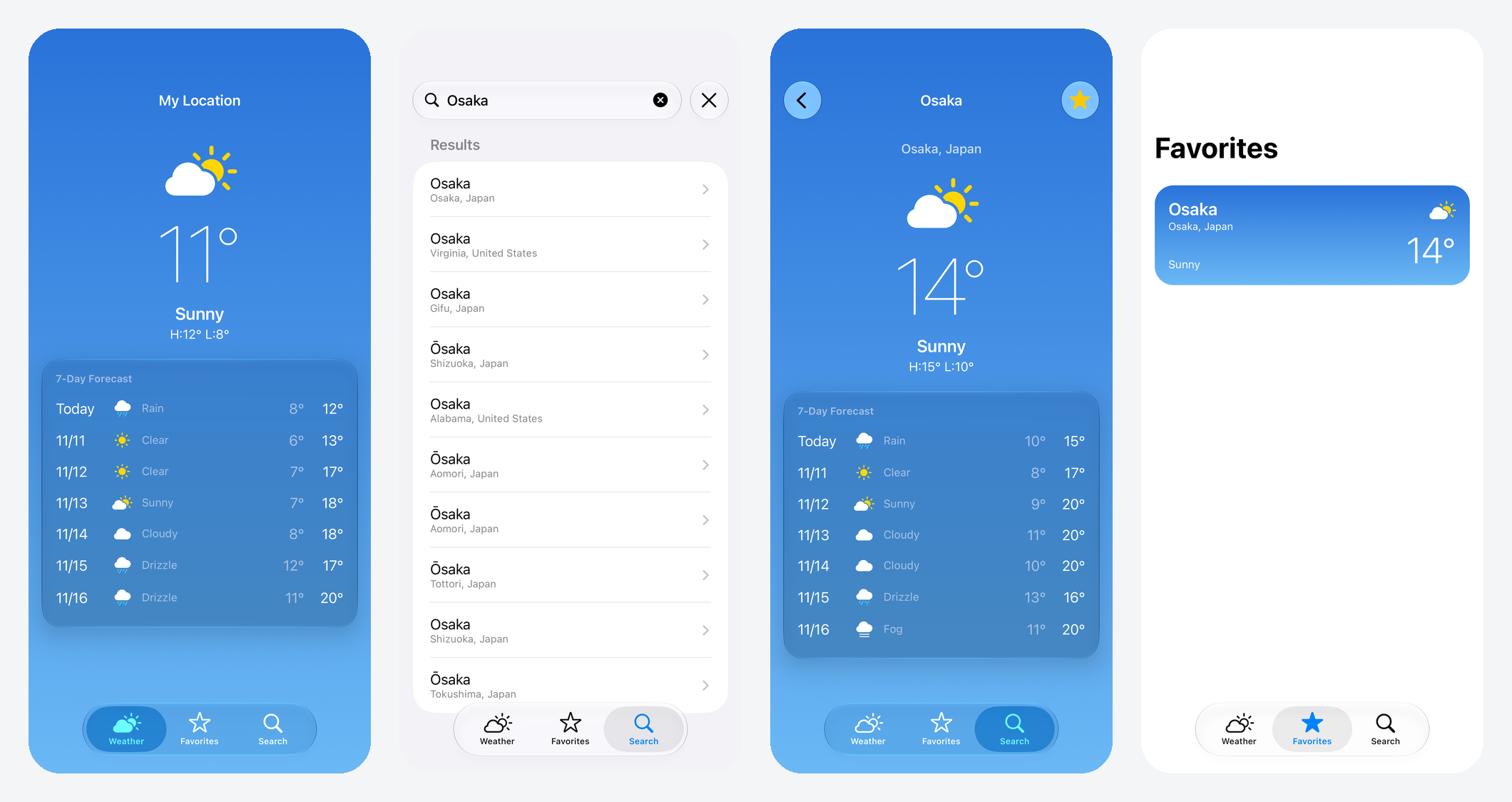 The app on iOS. From left: current weather, city search, city detail, and favorites.
The whole app is app.contract (356 lines), app.ts (126 lines), and app.test.contract (38 lines). That’s all it took to get iOS, macOS, and web builds.
I let Claude Code do most of the work. The README has a flow for “ask an agent to make an app with exact new”, and that flow actually worked end to end: the agent read the docs, built the app, wrote tests, and checked it on each platform.
Writing the UI in Contract#
Contract uses indentation to nest elements. For example, here’s the part that draws a large temperature with a 7-day forecast on top of a sky gradient:
component ForecastView
  props
    tab: string
    forecast: Forecast
  view
    column align-items="center" gap=4
      image symbolOf(forecast.code) aria-hidden=true -exact-symbol-rendering="multicolor" font-size="3.5rem"
      text deg(forecast.temp) font-size="5.5rem" font-weight=100 testId=`temp-${tab}`
      text describe(forecast.code) font="-exact-title3" font-weight=600
    column padding=16 border-radius=24 backgroundMaterial="glass"
      text "7-Day Forecast" font="-exact-caption1" font-weight=600 color="-exact-secondary-label"
      for d, i in forecast.days key=d.date
        row align-items="center" gap=8 padding="8px 0"
          text (i == 0 ? "Today" : d.date.slice(5).replaceAll("-", "/")) width="3.25rem"
          ...
backgroundMaterial="glass" becomes Liquid Glass (UIGlassEffect) on iOS 26. font="-exact-title3" maps to an iOS text style that follows Dynamic Type. Colors use role names like -exact-secondary-label, so dark mode just works.
Tabs and navigation are declared under routes:
routes nav
  tab weather "/"
  tab search "/search"
    city "/city/:id"
  tab favorites "/favorites"
    favorite "/favorites/:id"
Each screen’s URL is set here, so browser back, reload, and sharing a URL all work on the web. On iOS, the same declaration produces a standard UIKit tab bar and navigation bar, and the search field in the header becomes a UISearchController.
Fetching data in TypeScript or Rust#
Contract can’t do I/O, so network and storage live in a data module. You can write it in TypeScript (app.ts) or in Rust (a data crate). I used TypeScript.
On the Contract side: declare what to read#
Reads are declared as resource, writes as mutation, and the shape of the result as shape.
shape Forecast
  ready: bool
  temp: number
  code: number
  days: Day[]

component App
  state query = ""
  resource here = forecast(lat, lon, located) as shape Forecast
  resource results = searchCities(query) as shape Results else empty()
  resource favorites = loadFavorites() as shape FavoriteItem[] else empty()
  mutation toggled as shape Reply queue refreshes favorites, cities

  action toggle(c: City)
    send toggled = toggleFavorite(c.id, c.name, c.region, c.lat, c.lon)
resource results = searchCities(query) re-runs whenever query changes. The favorite toggle goes out as a mutation, and refreshes favorites, cities reloads favorites and city details after the write. The runtime tracks loading and failure state, which the view reads via pending(here) or failed(here). No need to carry a loading flag in state yourself.
On the TypeScript side: answer each declaration#
app.ts exports a function per declared name. The types come from app.contract.d.ts, generated from the Contract, so you can use shape types directly, like Result<'forecast'>.
import type { Answer, Result, Sources, Storage } from './app.contract.d.ts';

const FORECAST = 'https://api.open-meteo.com';
const GEO = 'https://geocoding-api.open-meteo.com';
const FAVORITES = 'app:/data/favorites.json';
export const grants = [
  `net.fetch ${FORECAST}`,
  `net.fetch ${GEO}`,
  'device.geolocation-approximate locationPurpose',
  `fs.read ${FAVORITES}`,
  `fs.write ${FAVORITES}`,
].join('\n');

type Forecast = Result<'forecast'>;

const blank: Forecast = { ready: false, temp: 0, code: 0, days: [] };
async function get(url: string): Promise<any> {
  const res = await fetch(url, { exactTimeout: 10000 });
  if (!res.ok) throw new Error(`HTTP ${res.status}`);
  return res.json();
}

async function forecast(lat: number, lon: number): Promise<Forecast> {
  const q = new URLSearchParams({
    latitude: String(lat),
    longitude: String(lon),
    current: 'temperature_2m,weather_code',
    daily: 'weather_code,temperature_2m_max,temperature_2m_min',
    timezone: 'auto',
  });
  const r = await get(`${FORECAST}/v1/forecast?${q}`);
  return {
    ready: true,
    temp: r.current.temperature_2m,
    code: r.current.weather_code,
    days: r.daily.time.map((date: string, i: number) => ({
      date,
      code: r.daily.weather_code[i],
      max: r.daily.temperature_2m_max[i],
      min: r.daily.temperature_2m_min[i],
    })),
  };
}

const sources: Sources = {
  forecast: ([lat, lon, located]) => (located ? forecast(lat, lon) : blank),
  searchCities: ([query]) => searchCities(query),
  toggleFavorite: async ([id, name, region, lat, lon], _store, storage) => {
    const all = await readFavorites(storage);
    const next = all.some((c) => c.id === id)
      ? all.filter((c) => c.id !== id)
      : [...all, { id, name, region, lat, lon }];
    await storage.fs.atomicWriteFile(FAVORITES, new TextEncoder().encode(JSON.stringify(next)));
    return { ok: true };
  },
  // loadCities and loadFavorites omitted
};

export const answer: Answer = (source, args, store, storage, native) =>
  sources[source](args, store, storage, native);
It’s plain fetch and async/await, not very different from fetching data in React. exactTimeout is an Exact-specific fetch option; here it times out after 10 seconds. The bigger difference is grants: the module can only reach the URLs and files declared there. Anything else is blocked. According to the README, the return value is checked at runtime against the shape declared in Contract.
locationPurpose on the location line is a string key. The text I put under that key in strings/en.json showed up as the message in iOS’s permission dialog.
The Rust option#
The same resource and mutation declarations can also be answered from Rust, by implementing Exact’s DataSource trait in a crate. The docs mention apps that mix TypeScript and Rust modules, so a reasonable split would be to write most of it in TypeScript and drop down to Rust for hot paths. I didn’t try this yet.
Logic is separated from the UI and can run without it#
The thing Exact reminded me of most is Shopify’s Reflex, which I tried the other day. Reflex pulls app state, actions, and navigation out of the UI into a “core” that an agent can read and operate from a CLI, without the UI running.
Where the line gets drawn is a bit different, though. Reflex puts state and actions in a separate Core. Exact puts state, actions (the ViewModel role), and the screen in one file, app.contract. What’s independent from the UI isn’t the file layout but the execution model. State and actions are executed from the same plan — by the Rust runner on native, and by the JS runtime on the web — and UIKit or the DOM just draws the result. Because of that, an agent can read state and drive the app the same way on any platform.
When I built the same weather app with Reflex in Swift/Kotlin and in Expo earlier, I had to build a lot of these pieces myself: a place to keep each screen’s state, functions that returned state and actions, a CLI, and a test harness. In Expo, navigation state lives inside the UI (Expo Router), which made it harder to work with headlessly.
Exact ships with all of it:
| What I built myself for Reflex | Exact |
|---|---|
| Per-screen logic that takes actions and returns state | Contract’s state and action. Only action can change state. |
| A seam for swapping network and storage from outside | The data module (app.ts) and grants |
| A way to keep navigation state outside the UI | routes nav. The per-tab stack is also readable through state nav. |
| A CLI to read and operate screen state | Agent commands: state, tap, type |
| A way to run the same behavior tests on each platform | app.test.contract runs the same way on web, iOS, and macOS |
Tests look like this. Elements are addressed by testId:
test "a city opened from search and starred stays in Favorites after a relaunch"
  tap "tab-search"
  type "search-input" "Osaka"
  clock +400
  clock data
  tap "result-1853909"
  clock data
  expect text "region-search" == "Osaka, Japan"
  tap "star-search"
  clock data
  reload
  tap "tab-favorites"
  clock data
  expect tree has "fav-1853909"
clock is the interesting one. Exact hands the clock to the agent: nothing moves between commands. clock data delivers the next network response, clock +400 advances the clock by 400 ms, and so on. Because time only moves when you ask, tests don’t need sleep around animations or network calls, and they don’t flake on timing.
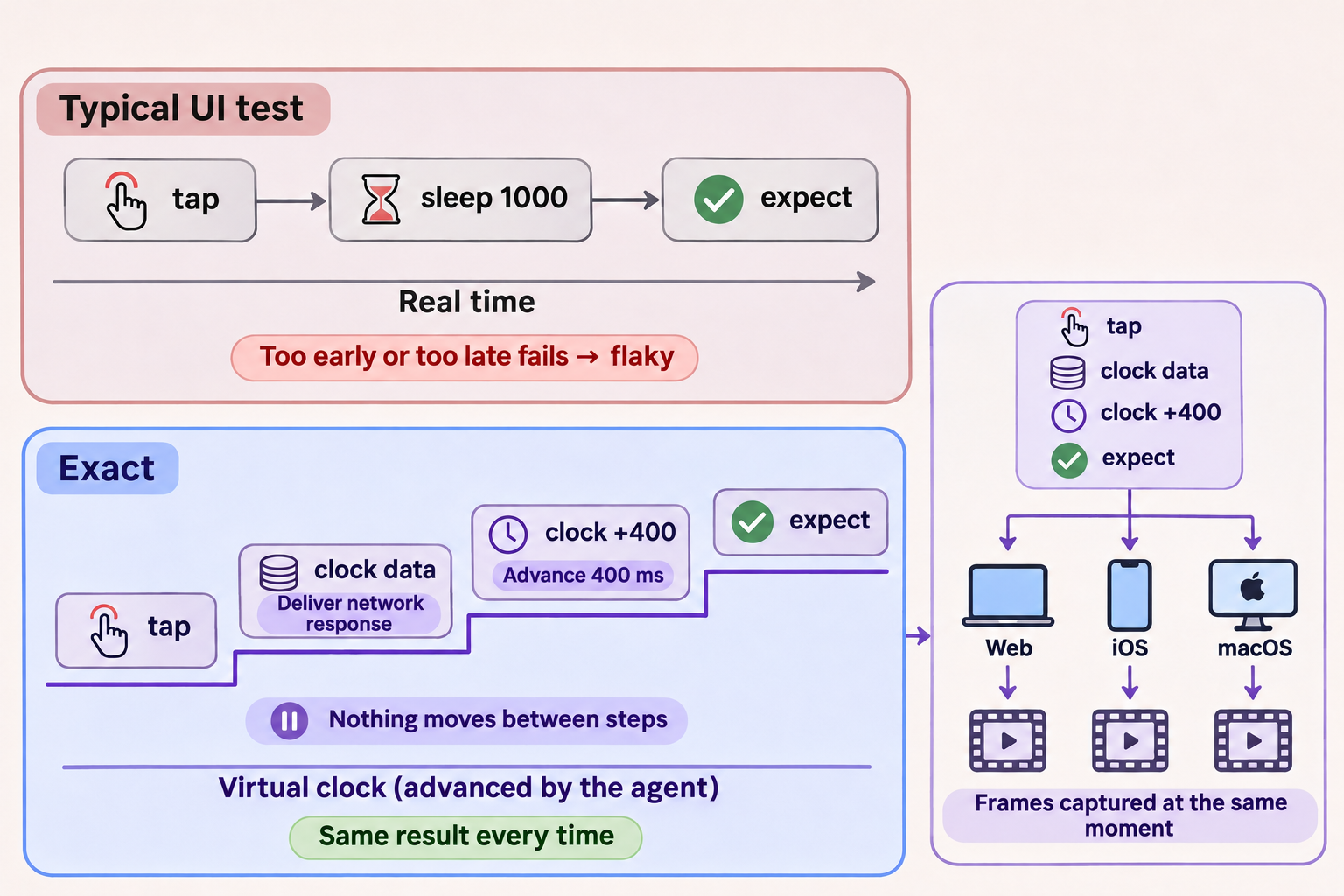 A normal UI test waits in real time. In Exact, the agent advances the clock. Run the same command sequence on three platforms and the frames line up.
All three tests (one is shown above) pass unchanged on the web and on the iOS Simulator with bun exact.mjs test ios.
Recording three platforms in sync#
The opening video takes advantage of the frozen clock. The agent has an operation that takes screenshots while advancing the clock:
bun exact.mjs agent ios "tap tab-search" "type search-input Osaka" \
  "screenshot film.apng over 1500 every 33 window"
Run the same sequence against web, iOS, and macOS, and the frames come out at the same virtual time on all three. Stacking them side by side gives you a frame-synced video. Not having to line up a screen recording with tap timing was a real quality-of-life win.
Compared to the native version#
To compare side by side, I tweaked the Exact app’s design to match my earlier SwiftUI version.
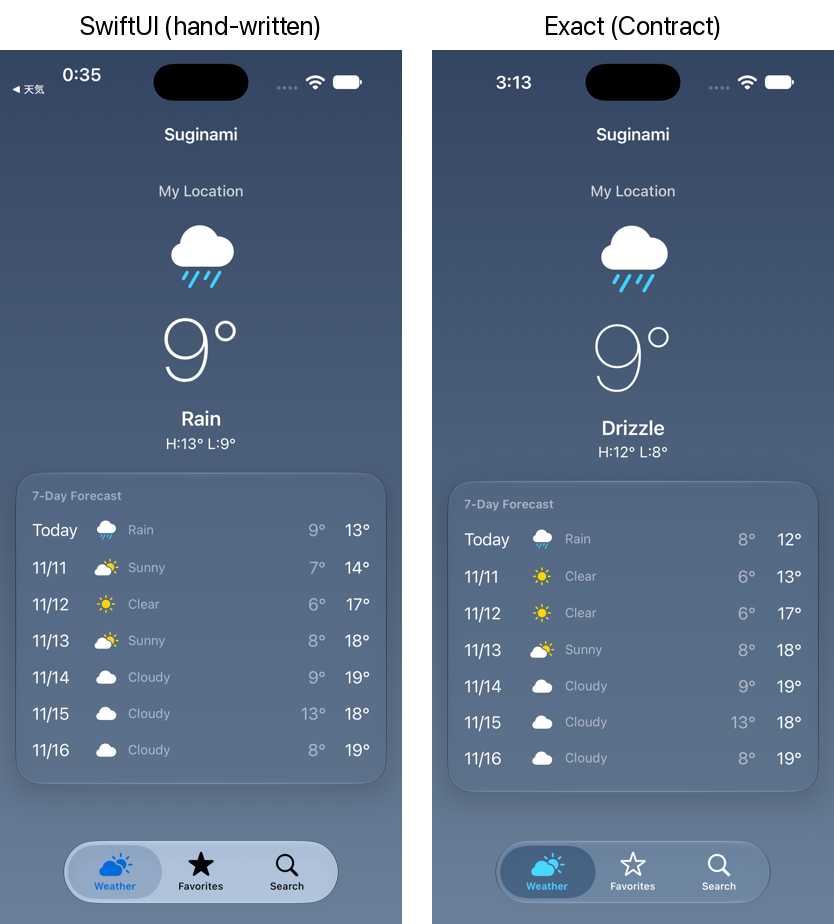 SwiftUI on the left, Exact on the right. The weather data differs a bit because the screenshots weren’t taken at the same time.
Pretty close. The tab bar is iOS 26’s standard Liquid Glass one — Contract only lists the tabs and specifies nothing about how they should look.
The same code also runs on macOS with AppKit windows and toolbars, and the result looks and feels native.
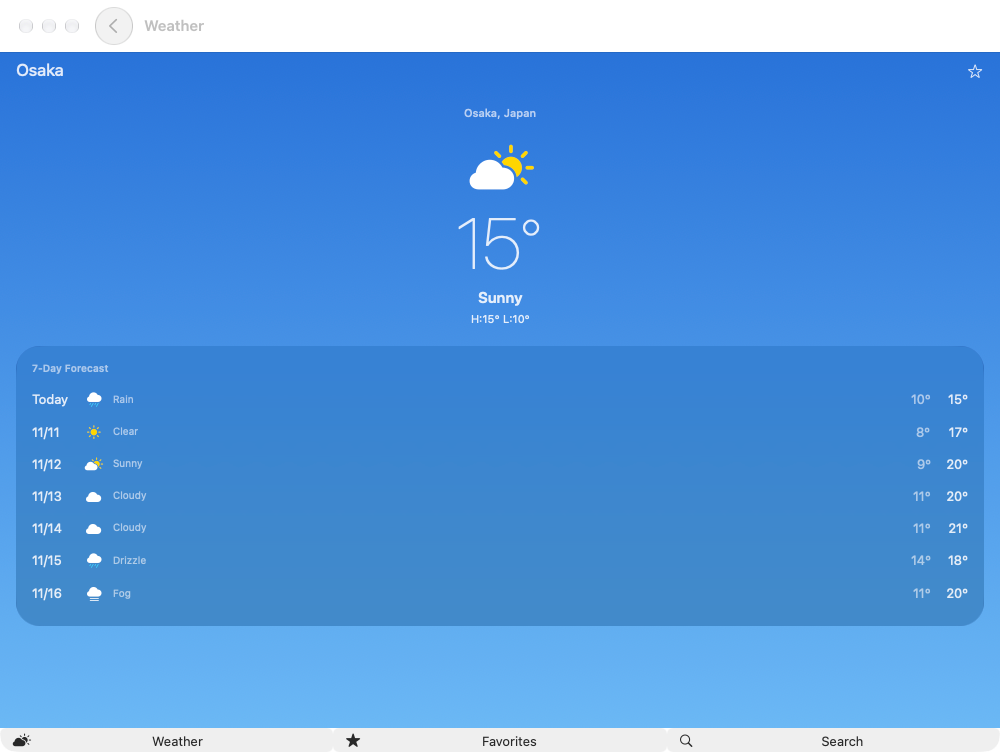 The city detail on macOS. Tabs sit at the bottom of the window.
App size and launch time#
Since I had the same weather app in SwiftUI, React Native (Expo), and Exact, I compared size and launch time too.
App size#
I built each app as a Release build for iOS devices (arm64) and packaged them as unsigned IPAs. App Store downloads go through App Thinning, so real download sizes will differ.
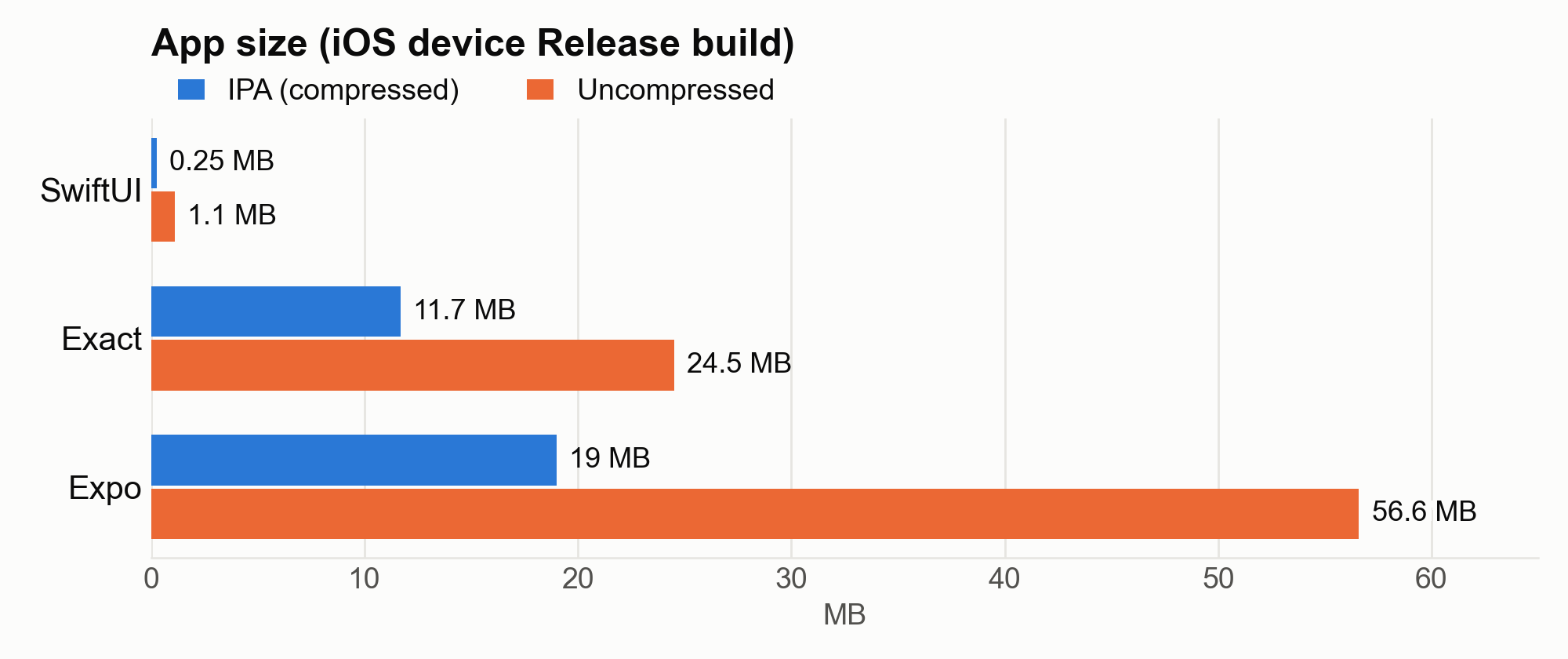
| IPA (compressed) | Uncompressed | |
|---|---|---|
| SwiftUI | 0.25 MB | 1.1 MB |
| Exact | 11.7 MB | 24.5 MB |
| Expo (SDK 58 / React Native 0.88) | 19.0 MB | 56.6 MB |
Almost all of the Exact app is a single executable (23.8 MB) containing the Rust runner, the layout engine, the UIKit host, and Hermes. The Expo app splits across React.framework (11.9 MB), Hermes (6.4 MB), the app binary (20.9 MB), and icons and other assets in Assets.car (6.0 MB).
Compared to Expo, Exact is less than half the uncompressed size (and about 60% of the IPA size). Exact is still early, so there’s room to shrink further. Even so, a native SwiftUI app weighs in at about 1 MB — the UI framework lives in the OS, and there’s no runtime to ship.
Inside the Exact binary#
Of the 23.8 MB binary, 19.6 MB is code, about 3 MB is strings and constants, and about 1 MB is linker metadata (__LINKEDIT). Here’s how the 19.6 MB of code breaks down by language and module, based on dSYM symbols:
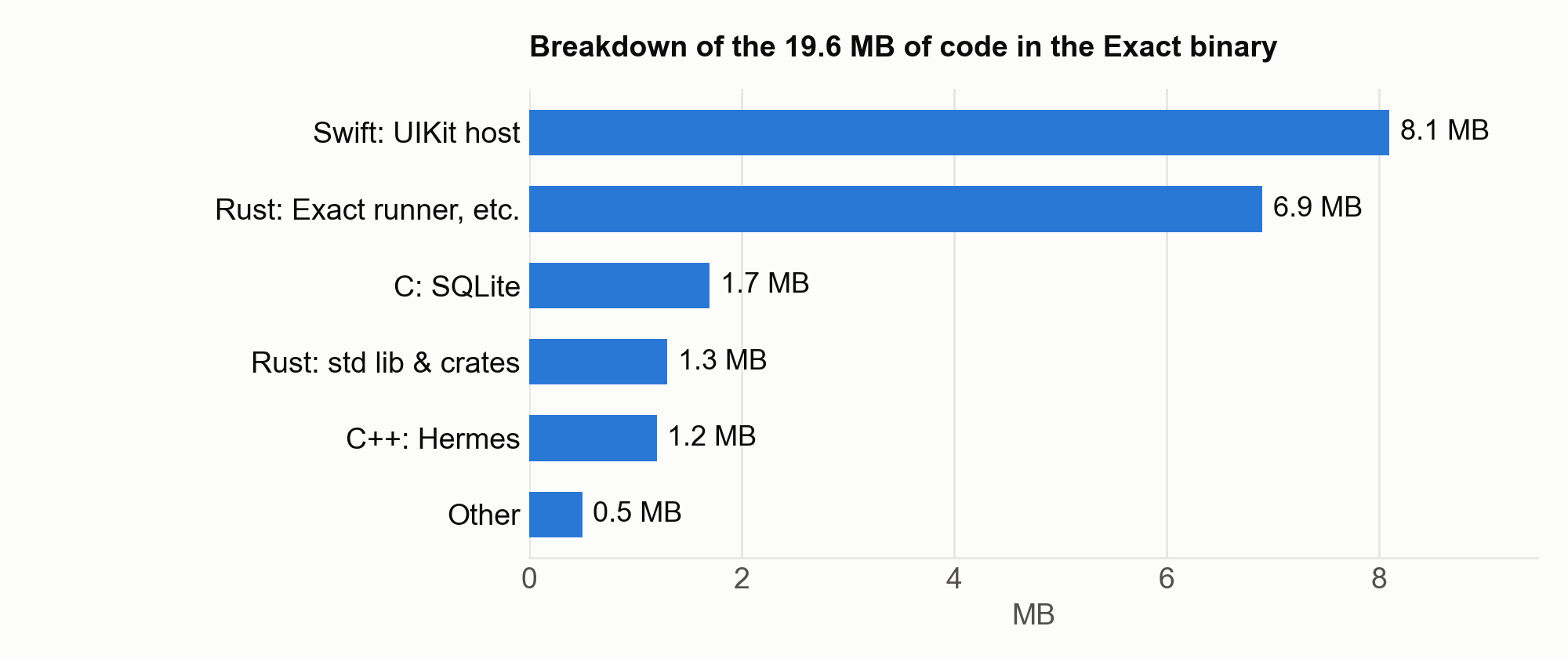
| Contents | Size |
|---|---|
| Swift: the UIKit host (ExactKit, ExactCore, etc.) | 8.1 MB |
| Rust: the Exact runner and kernel (including generics monomorphized for Exact’s types) | 6.9 MB |
| C: SQLite | 1.7 MB |
| Rust: standard library and crates (Taffy 0.3 MB, the Ibex2 storage layer, etc.) | 1.3 MB |
| C++: Hermes | 1.2 MB |
| Other (C glue) | 0.5 MB |
On top of that, modules like location ride in a separate ExactModules.framework (0.5 MB).
The app-specific pieces are the compiled screen plan (41 KB) and the Hermes bytecode for app.ts (14 KB) — about 60 KB total. Everything else is the Exact runtime, so adding more screens shouldn’t grow the app much.
Hermes is 1.2 MB here, far smaller than the 6.4 MB hermesvm in the Expo build. Exact uses the lightweight Ibex distribution of Hermes (hermes-lean-sys) and compiles the TypeScript to bytecode at build time. One oddity: this app doesn’t use SQLite, but 1.7 MB of it ships anyway, because the storage layer (Ibex2) statically links it (the Expo build also ships SQLite via expo-sqlite).
These figures are estimates from differences between symbol addresses. Some Rust generics may be attributed to
core, so treat the breakdown as approximate.
Launch time#
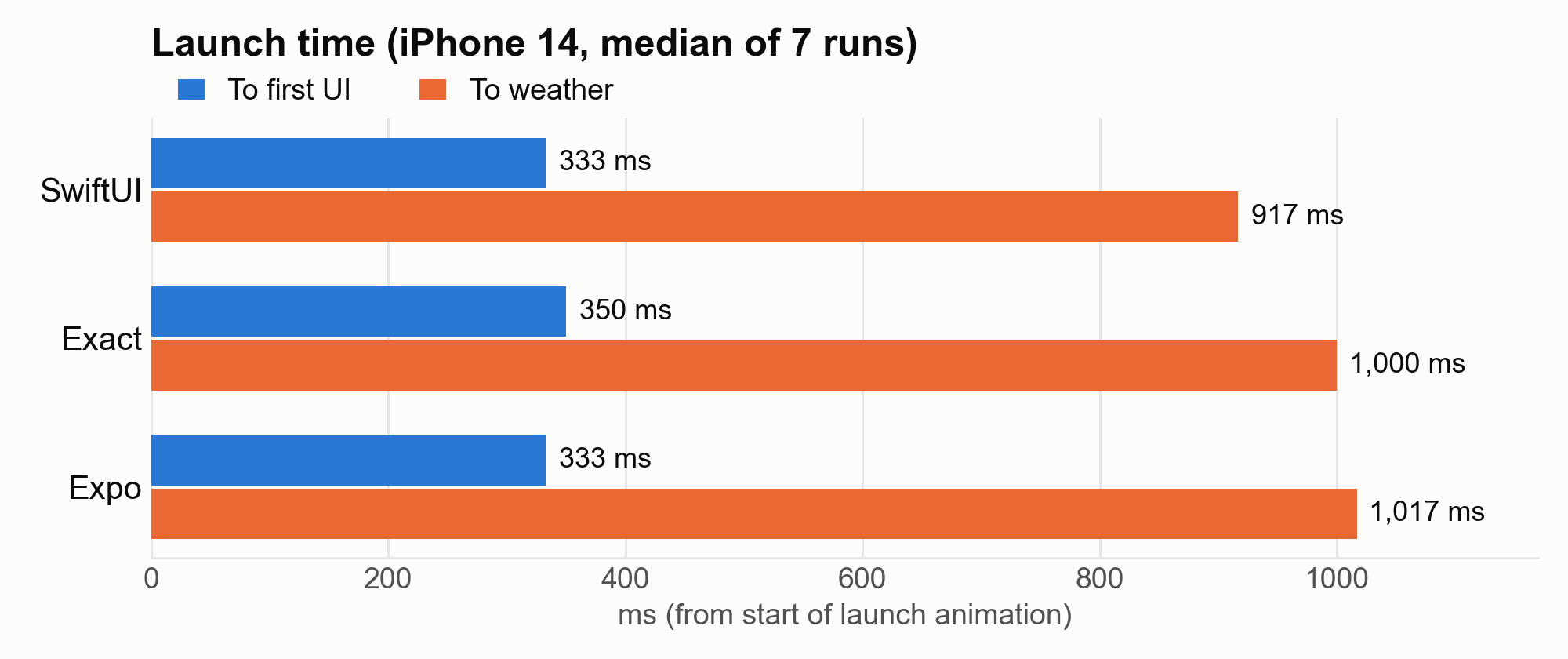
I installed all three Release builds on an iPhone 14 (iOS 26.6.1), screen-recorded each launch from the home screen at 60 fps on a Mac, and measured two numbers frame by frame. Each run killed the app and relaunched it with devicectl (no reboot, so these are warm launches). All three used the same script, and I took the median of seven runs.
- To first UI — from the start of the launch animation until the tab bar icons and labels appear
- To weather — until location is fetched, weather is loaded from Open-Meteo, and the screen settles
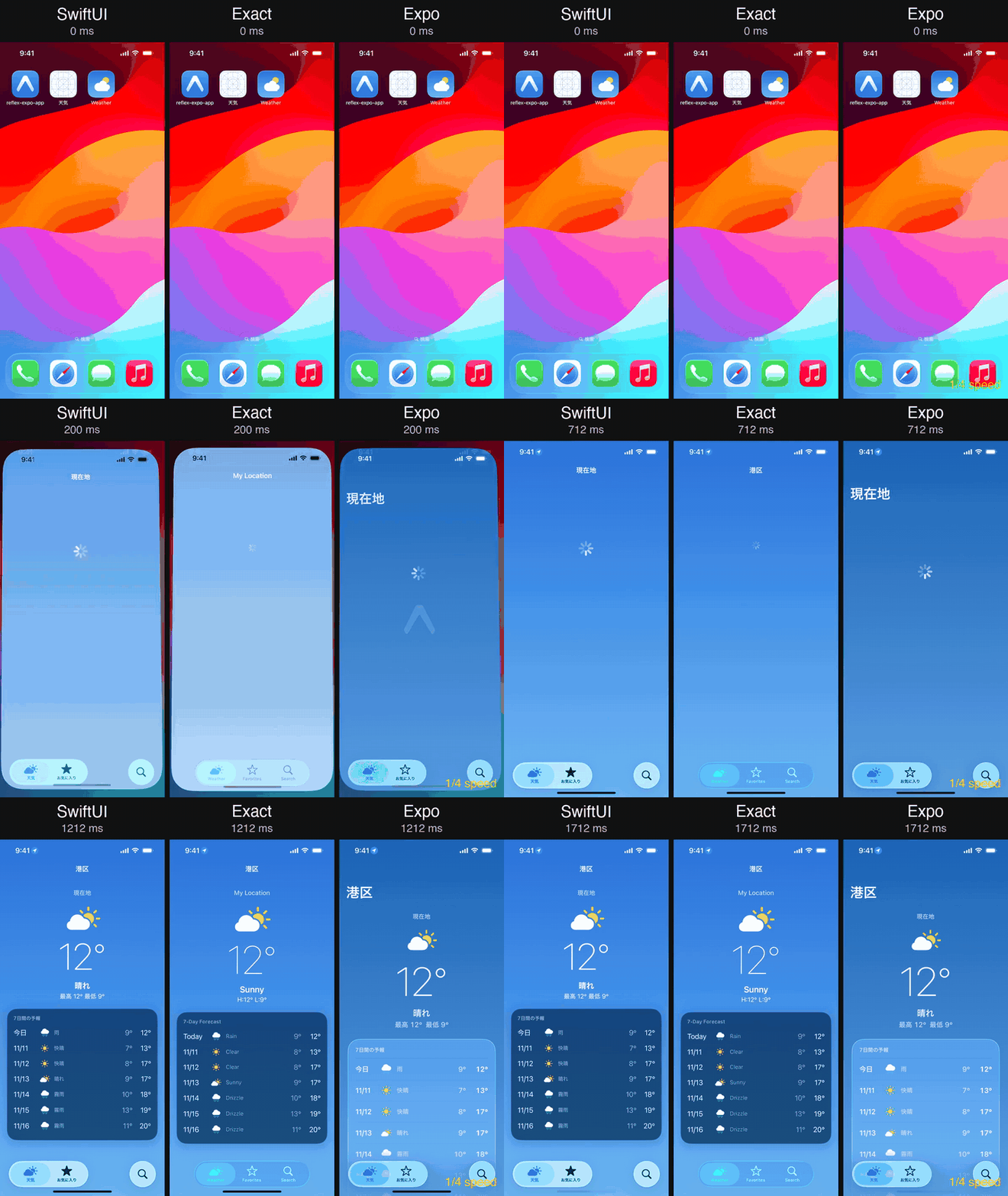 Launching all three on an iPhone 14. The launch animations are aligned, and the second half replays at 1/4 speed. The SwiftUI and Expo apps have Japanese UI.
| To first UI | To weather | |
|---|---|---|
| SwiftUI | 333 ms | 917 ms |
| Exact | 350 ms | 1,000 ms |
| Expo | 333 ms | 1,017 ms |
The three apps hit “first UI” within one frame (about 17 ms) of each other. That roughly 330–350 ms includes iOS’s own launch handling and animation, which every app pays. Exact’s design renders the first screen from the plan without waiting for JS, but at this app size it didn’t pull ahead of Expo. That design probably matters more as the JS bundle grows.
“To weather” includes location and network latency, so it isn’t really a runtime comparison.
At this scale, native, Expo, and Exact all feel about the same on launch.
Setup: iPhone 14 (iOS 26.6.1), Apple M2 Max (64 GB), macOS 27.0.1, Xcode 27.2. The phone’s screen is recorded from the Mac using the same mechanism as QuickTime. Runs where the launch didn’t appear in the recording were re-taken. The script is at tools/device-launch-time.py.
Built with agents in mind#
The thing I noticed most while building this is how much of Exact is shaped so an agent can make progress without getting stuck.
Built-in commands#
exact new scaffolds an app with an exact.mjs CLI next to it. All build, test, and interaction goes through bun exact.mjs <command>. The commands I used:
| Command | What it does |
|---|---|
web | Starts the web dev server. Reloads on save. |
ios / mac | Builds for the iOS Simulator or macOS (--run to launch) |
test | Runs app.test.contract. test ios picks a platform. |
agent | Drives the app (agent ios to pick a platform). Includes tree, tap, type, state, screenshot, clock, and so on. |
verify | Builds if needed, runs tests, checks every screen the tests reached in light and dark mode, and relaunches once. Prints verify: clean when done. |
contract build / contract vocab | Compiles a Contract and emits JSON diagnostics / looks up tags, properties, and examples |
pattern | Starts from a template that includes tests |
docs | Looks up sections of the guide by heading |
The agent calls these in sequence, reads the output, and decides what to do next. Here are a few logs from real sessions.
Compile errors tell you how to fix them#
This is what I got when the search field’s submit=search had no matching action. It doesn’t just say what’s missing — it tells you what to write:
{"col":67,"end_col":73,"file":"app.contract","id":"analyze-handler-arity","line":147,"message":"`submit=search` calls `search` with nothing; declare `action search`","related":[],"severity":"error"}verify catches visual issues too#
After running tests, verify revisits each screen that was reached by a test, in light and dark, at two widths, and at iOS’s largest text size. It reports contrast problems and text that overflows, with the element’s location, the reason, and how to fix it. Here’s part of a web run (from when the UI was still in Japanese):
verify web: about 30 s; one report when it ends
tests: 3 passed, 0 failed
check first screen, 3 test ends, relaunch · 390x844, 1280x900 · light, dark: 3 findings
  contrast ×2
    (…, 390x844 only) contrast Text "最高 13°  最低 10°"#116 [140,322 110×21]: 2.4:1 (#b6bdcc on #67778f), needs 3:1; -exact-secondary-label is too light for text on this: use -exact-label or -exact-secondary-label, or keep the colour for a fill or a symbol
fixed type: 1 font size the reader's text size does not move
  fixed    app.contract:204 text font-size=72: stays 72 px as Dynamic Type grows; a role (`font="-exact-title1"`) or a `rem` size ("4.5rem") scales
largest text size (root font size 53 px at 390x844, iOS's body at its largest), 13 screens: 7 findings (the app's own layout: give the text room; a smaller or fixed font is the tell)
While I was matching the SwiftUI design, this once turned up 37 contrast issues in a single pass. The agent read each one and fixed it on its own.
Docs are organized for agents#
There’s really only one document to read, docs/start-here.md. Everything else is looked up on demand. For example, bun exact.mjs contract vocab search returns how to build a search field, with examples:
search (a concept): the bar's search field, filtering a list or querying a server
An `input type="search"` in a route's `header` is the bar's search field: on iOS UIKit's
search controller (a magnifier, a clear button, Cancel), on the web a field under the title.
Each keystroke is its `input`, and the list filters on the query, so there is no Search
button. No match is an `EmptyState` in the list's place (`pattern list-detail`).
Rough edges#
Some things still feel early-stage:
- Platform-specific details
- On iOS, sending Enter to the search field through the agent didn’t trigger the search. I filed an issue with the cause and a fix.
- iOS 26’s standalone search tab (
role: .search) and the tab-bar accessory (bottomAccessory) can’t be set from Contract (though some of this might be reachable via Swift access hatches to the tab bar). - Icon size is determined by the
widthof the box, not byfont(which is the opposite of what the docs said). - Icons specified by SF Symbols names (
sf/...) are Apple-only and don’t render on the web. For web, use Exact’s role-based icon names (symbol:calendar, etc.) or ship your own SVG.
- No way to stub the network in tests
- The only thing tests can do with outbound requests is force a failure with
fail fetch. I was hitting the real Open-Meteo API, and a test failed once on a timeout.
- The only thing tests can do with outbound requests is force a failure with
- Initial web load
- The initial
app.jsis 343 KB uncompressed (95 KB gzipped). On Slow 4G + 4× CPU throttling, LCP was 2.4 s (0.4 s unthrottled locally).
- The initial
- Setup friction
- Bun 1.4.2+ is required, and my Rust toolchain was missing the iOS Simulator target, which broke the first build. First-time setup took a bit of work.
Wrapping up#
What stands out about Exact is that “an agent can operate it and verify it” and “logic is independent of the UI” are built into the runtime itself. And it does that on real UIKit, AppKit, and the DOM, not a WebView. The uncompressed app is less than half the size of the equivalent React Native build, and time to first UI is within a frame of SwiftUI.
Designs that assume an agent will drive and verify the app are showing up in several places now, like Shopify’s Reflex and Expo’s Exact.
If you’re interested in Rust-core cross-platform frameworks, there’s also Whisker. It uses Taffy for layout too, but you write the UI in Rust as well. It’s pre-alpha.
Exact is still pre-1.0, and platform-specific details and network fixtures in tests still need some filling in. Even so, I was honestly surprised by how much already works this early. It’s a framework built around working with agents, and I’m really looking forward to seeing where it heads.
The code is on GitHub: